Rebuilding WISDM HAR after a leaky 0.89
The June notebook printed 0.8559 phone accuracy. I froze that tree at git tag v1.0.0 and rebuilt the pipeline. Same 5 s phone flatten on repaired 20 Hz data: 0.8925 leaky macro-F1 versus 0.2924 under GroupKFold. The 18-class number I would serve is watch statistical XGBoost at 0.7031.
The 0.86 I published was a leaky split
In June I treated a phone-only XGBoost notebook as the project result. It printed Accuracy: 0.855905403547367. That walkthrough lived on this URL. The code from that week is still on GitHub as v1.0.0. I did not delete it. I tagged it, archived the notebooks, and asked a different question on the same dump.
Human activity recognition (HAR) here means: take a few seconds of accelerometer and gyroscope, and name one of 18 daily activities. Those two sensors, three axes each, are an inertial measurement unit (IMU). WISDM (UCI 507) records them from a phone in a pocket and a watch on the dominant hand, 51 people, codes A–S skipping N. There is no activity N. Eighteen classes, not nineteen. The June case study got that wrong.
On repaired 20 Hz data, the same flattened 5 s phone windows still look strong if I shuffle them the way the notebook did: 0.8925 macro-F1 (configs/protocol_a2_phone_raw_flat_xgb.yaml). Macro-F1 is the unweighted mean of per-class F1. I use it as the primary metric because accuracy can hide that pasta and sitting are noise. GroupKFold on subject_id drops that flatten to 0.2924 (configs/protocol_b_phone_raw_flat_xgb.yaml).
Mermaid source
flowchart LR
  W["Same 5 s phone flatten"] --> A["A2 leaky shuffle"]
  W --> B["B GroupKFold on subject_id"]
  A --> A2["0.8925 macro-F1"]
  B --> B2["0.2924 macro-F1"]
That drop is the finding. The 18-class number I would actually serve is watch statistical XGBoost at 0.7031 GroupKFold (configs/protocol_b_watch_stat_xgb.yaml). Pocket phone on the same feature family is 0.3272. Concatenating phone and watch windows as extra rows lands in between, at 0.5236. That concat is still six channels per window, not time-aligned 12-channel fusion. The June reflection said I would fuse next and jump past 90% with a CNN-LSTM. I have no evidence for that jump. I have evidence that stacking both devices without alignment does not beat the watch.
v1.0.0 did what student HAR notebooks usually do
The tagged tree is DataLoader.ipynb, analysis.ipynb, and PhoneXGB2.ipynb: no package, no tests, no subject-grouped split. TensorFlow sat unused in requirements.txt. Watch files were on disk and unused. Evaluation lived in a generic writeup, not a model card. The notebook concatenated 15,649,253 rows, inner-joined phone accel and gyro on exact timestamps, cut 80-sample windows with hop 40, flattened them to 480 numbers, dropped subject id, and called train_test_split. Early stopping watched the test set. A scaler saw every row before the split. Random search landed on 982 trees, max_depth 6. I still have that run: accuracy 0.8559. Macro-F1 was not reported.
Those steps leak. Once Subject-id is gone, the same gait and the same pocket sit on both sides of the split, so a tree can memorize people. Hop 40 on length 80 puts overlapping windows from one bout in train and test. get_frames slid over the concatenated table, so a window at a file boundary can mix two activities or two people. Sample deltas are about 5.03e7; as nanoseconds that is ~50 ms, about 20 Hz, but pd.to_datetime(..., unit="us") turns the same integers into ~50 s gaps and decorative 2019 datetimes. Deltas are usable. Absolute epoch is not. Heydarian and Doyle (rWISDM) already warned that the published Unix times do not match 2017. IMU clocks almost never share sample instants, so an inner join on the raw timestamp drops and distorts rows. I knew clocks drift and still merged on Timestamp in v1 because that is the join you write when you want a 6-column matrix today. The official line format is subject-id, activity-code, timestamp, x, y, z; with a trailing semicolon on z; student read_csv kept that semicolon as part of the string.
I am not going to relitigate v1 class by class from the leaky confusion matrix. Walking vs jogging vs stairs, and the eating cluster, already showed up there. Under a subject-independent split those confusions survive. The 0.89 score does not.
The dump is not a clean 20 Hz grid
UCI 507 claims 51 subjects (1600–1650), 18 activities for three minutes each, 20 Hz, phone in the pocket, watch on the dominant hand. The description PDF is WISDM-dataset-description.pdf. Instance count on the UCI page is 15,630,426. My extract matches Weiss stream totals exactly: phone accel 4,804,403, phone gyro 3,608,635, watch accel 3,777,046, watch gyro 3,440,342. Total 15,630,426. The extra 18,827 rows in the student concat are a loader artifact, not extra physics.
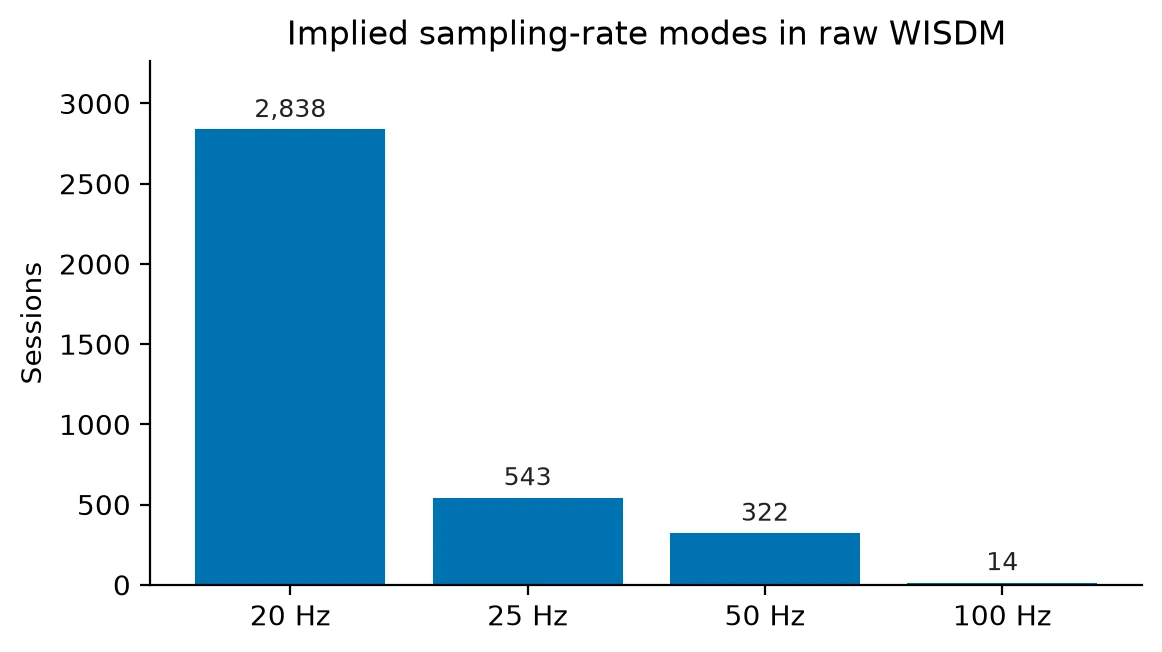
Implied Hz from timestamp deltas in this dump clusters at 20 (2,838 sessions), 25 (543), 50 (322), and 100 (14). A 200-row official ARFF window is 10 s at 20 Hz and about 4 s at 50 Hz, so windowing by row count mixes time scales. ARFF is Weka's attribute-relation format; WISDM ships precomputed 10 s feature files that assume 20 Hz. I did not train on those files as ground truth. 35 subject × activity × stream cells are empty. Phone accel alone is missing 1607 J, 1609 B, 1616 B and F, 1618 O, 1642 C and F, 1643 I. rWISDM had already listed a subset of those phone-accel holes; the 18-class grid has more, including watch and gyro. There are no demographics, so there is no fairness slice. Zero NaNs. Zero non-monotonic timestamps. The defects are coverage, sampling rate, and orientation, not garbage floats.
Repair so a window is 5 seconds of real time
python -m har.data.repair interpolates each (subject, activity, device) session onto a shared 20 Hz grid. Accel and gyro are aligned by the intersection of their coverage, not by an exact-timestamp join. Phone-accel reorient is implemented and off by default. Start-of-trial trim is implemented and 0 s by default.
Mermaid source
flowchart LR
  R["Raw WISDM txt"] --> P["Parse runs"]
  P --> I["Interpolate 20 Hz"]
  I --> A["Align accel+gyro"]
  A --> W["Session 5 s windows"]
  W --> F["104-d stats or flatten"]
Windows are 5.0 s with a 1.0 s hop, built inside one session. They never slide across subject or activity boundaries. At 20 Hz that is T=100, C=6. A session shorter than 5 s yields no windows. Coverage below 0.95 (any non-finite channel) drops the window. Default features are 104-dimensional statistical summaries: per-axis moments, a 10-bin histogram, magnitude, pairwise correlations. That family is what the official ARFF was pointing at, minus MFCC. Flattened raw windows exist so I can compare the student representation on the same repaired sessions. Six-channel flatten is 600 numbers on a 5 s window; the 80-sample A1 clone is 480. I skipped peak-interval and MFCC on purpose. Phone eating is still a mess after statistical features. Adding cosine-mel bins does not get you out of a pocket IMU that cannot see a fork. Parser, audit, repair, windowing, and splits have fixture tests. CI never downloads WISDM.
Three protocols, because one number is a trap
Protocol A copies the notebook and early-stops on the test set. A1 is the closest clone of PhoneXGB2.ipynb (leaky train_test_split on 80-sample / hop-40 flatten). A2 is the leaky side of the same-representation pair (5 s / 1 s flatten). Protocol B is 5-fold GroupKFold on subject_id and is the main table. Protocol C is a 46/5 grouped holdout, 3 repeats from one seed: a phone holdout check, not 51-fold leave-one-subject-out (LOSO). Protocol D, train phone / test watch and reverse, is specified and not run. Everything except A fits scalers, encoders, and early stopping on training subjects only. Nested XGBoost validation on B/C is one held-out train subject, not a separate validation cohort.
A1 and A2 train on the repaired parquet. They clone the student split and window geometry, not the unrepaired concat table. Do not treat A2 0.8925 vs the notebook 0.8559 as a leakage-only delta. Parse, timestamps, and the accel/gyro join already changed the matrix. A1 came out 0.8490 macro-F1 / 0.8475 accuracy (configs/protocol_a1_phone_raw_flat_xgb.yaml), in the same ballpark as 0.8559, on 80-sample windows. Different geometry from A2. The leakage experiment is A2 vs B on 5 s flatten, same 982-tree family the notebook used. Honest B/C XGBoost is a smaller family: 200 trees, max_depth 6. Config YAML may say device: cuda; export and machines without a GPU fall back to CPU. I am not treating those runs as a 982-tree reproduction.
Same flatten, leaky vs grouped
| Protocol | Config | Model | macro-F1 | Accuracy |
|---|---|---|---|---|
| Student notebook | notebooks/archive/student_evaluation.txt | xgboost | not reported | 0.8559 |
| A1 leaky | protocol_a1_phone_raw_flat_xgb | xgboost (982 trees) | 0.8490 | 0.8475 |
| A2 leaky | protocol_a2_phone_raw_flat_xgb | xgboost (982 trees) | 0.8925 | 0.8913 |
| B GroupKFold | protocol_b_phone_raw_flat_xgb | xgboost (982 trees) | 0.2924 | 0.3047 |
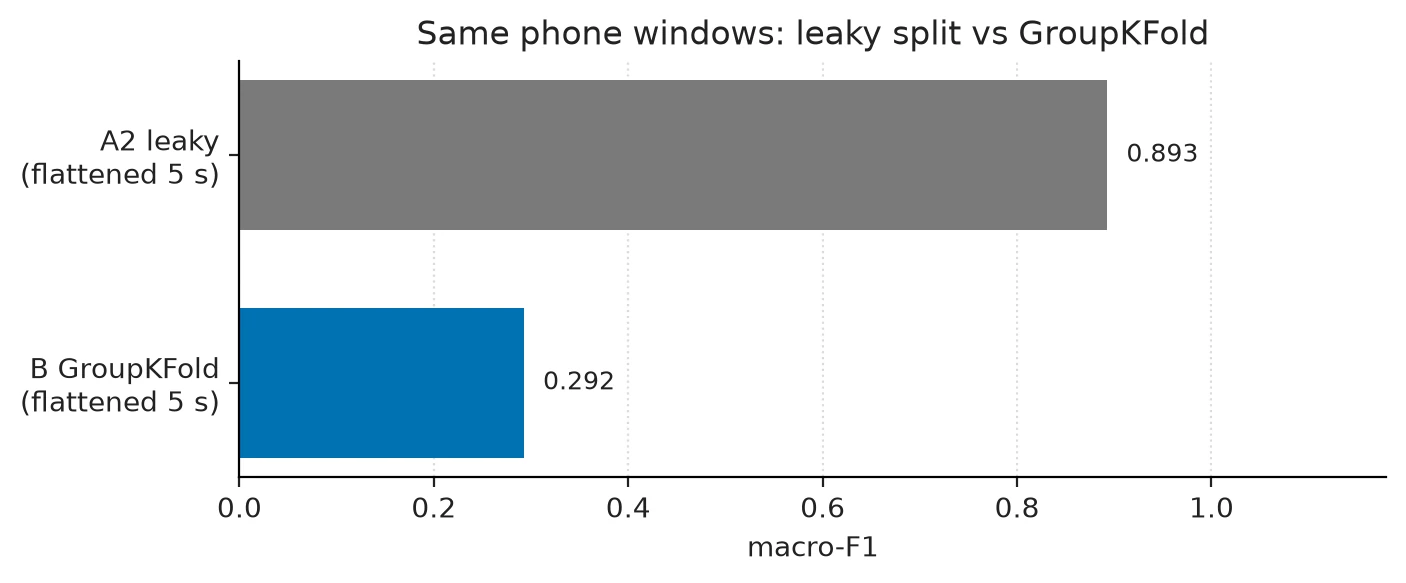
A2 train and test subject lists are the same 51 ids. That is the leak, written down. GroupKFold folds do not share people. If you only remember one pair from this post, remember 0.8925 vs 0.2924.
What actually classifies 18 activities
Protocol B, statistical features, GroupKFold 5, repaired 20 Hz, 5 s windows, full 51-subject UCI 507.
| Device | Config | Model | macro-F1 | Accuracy |
|---|---|---|---|---|
| phone | protocol_b_phone_stat_dummy | stratified dummy | 0.0151 | 0.0551 |
| phone | protocol_b_phone_stat_logreg | logreg | 0.2767 | 0.2799 |
| phone | protocol_b_phone_stat_rf | random forest | 0.3131 | 0.3252 |
| phone | protocol_b_phone_stat_xgb | xgboost (200 trees) | 0.3272 | 0.3382 |
| phone | protocol_b_phone_raw_flat_xgb | xgboost (982 trees), flatten | 0.2924 | 0.3047 |
| watch | protocol_b_watch_stat_xgb | xgboost (200 trees) | 0.7031 | 0.7013 |
| both (stacked rows) | protocol_b_concat_stat_xgb | xgboost (200 trees) | 0.5236 | 0.5267 |
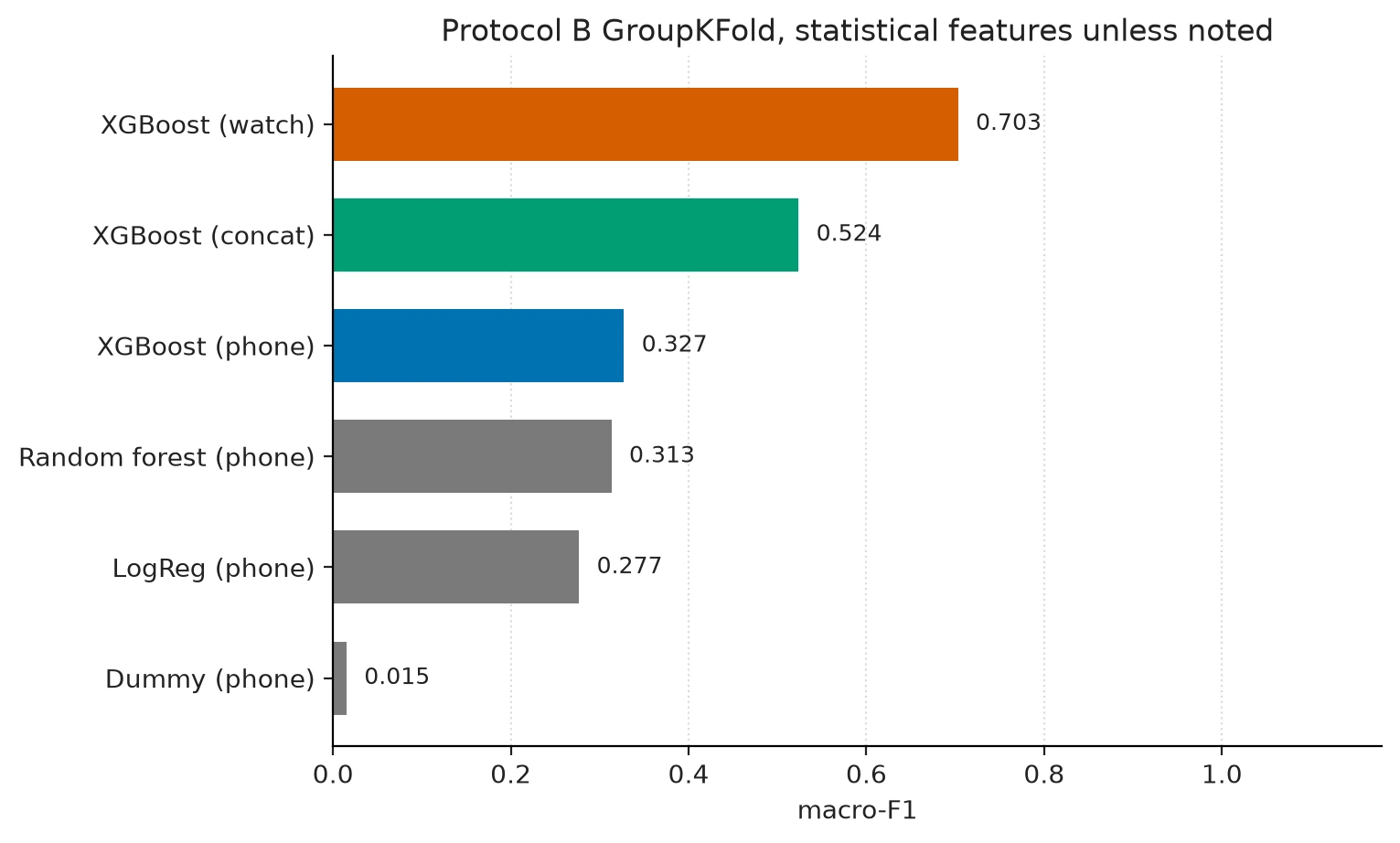
Statistical phone XGBoost beats flattened raw under the same protocol. Gradient boosting beat dummy, logistic regression, and random forest on that phone table, so I did not add a 1D CNN or temporal convolutional network (TCN). "Trees won" means they won this classical ladder on these windows. It does not mean a network cannot win later. A later TCN is only a claim if it uses the same GroupKFold splits and the same windows, with a row next to protocol_b_phone_stat_xgb. Watch fold macro-F1 ran from 0.637 to 0.770 (std_fold_macro_f1 0.0506). Phone was tighter (std 0.015). The 0.7031 headline is a pooled number with real person-to-person spread. Protocol C phone statistical XGBoost is 0.2985 macro-F1, unweighted mean of three 46/5 repeats (configs/protocol_c_phone_stat_xgb.yaml). It tracks Protocol B phone (0.3272), not Protocol A. Full 51-subject XGBoost is an overnight local run. 51-fold LOSO would be that overnight, fifty-one times.
Pocket phone finds locomotion. It cannot name dinner.
Phone statistical XGBoost under Protocol B (protocol_b_phone_stat_xgb.json): locomotion as a group is F1 0.8873. Eating as a group is 0.4945. Per-class F1: pasta 0.0749, soup 0.0807, chips 0.0964, drinking 0.1050, sandwich 0.1064, sitting 0.1943. Stairs (0.6588) and kicking (0.6470) are the weakest locomotion classes. They are not the worst overall. Sitting is worse than stairs. The June post called sitting a standout class. That was the leaky phone story, where the model had already seen that person's still pocket.
Watch on the dominant hand flips the picture: locomotion 0.9292, hand 0.8788, eating 0.8450, posture 0.6606. Stairs 0.7028, kicking 0.7831. The hard watch class is sandwich (L) at 0.2816. Typing, brushing teeth, catch, dribbling, writing, clapping, folding are all much easier once the IMU is on the wrist.
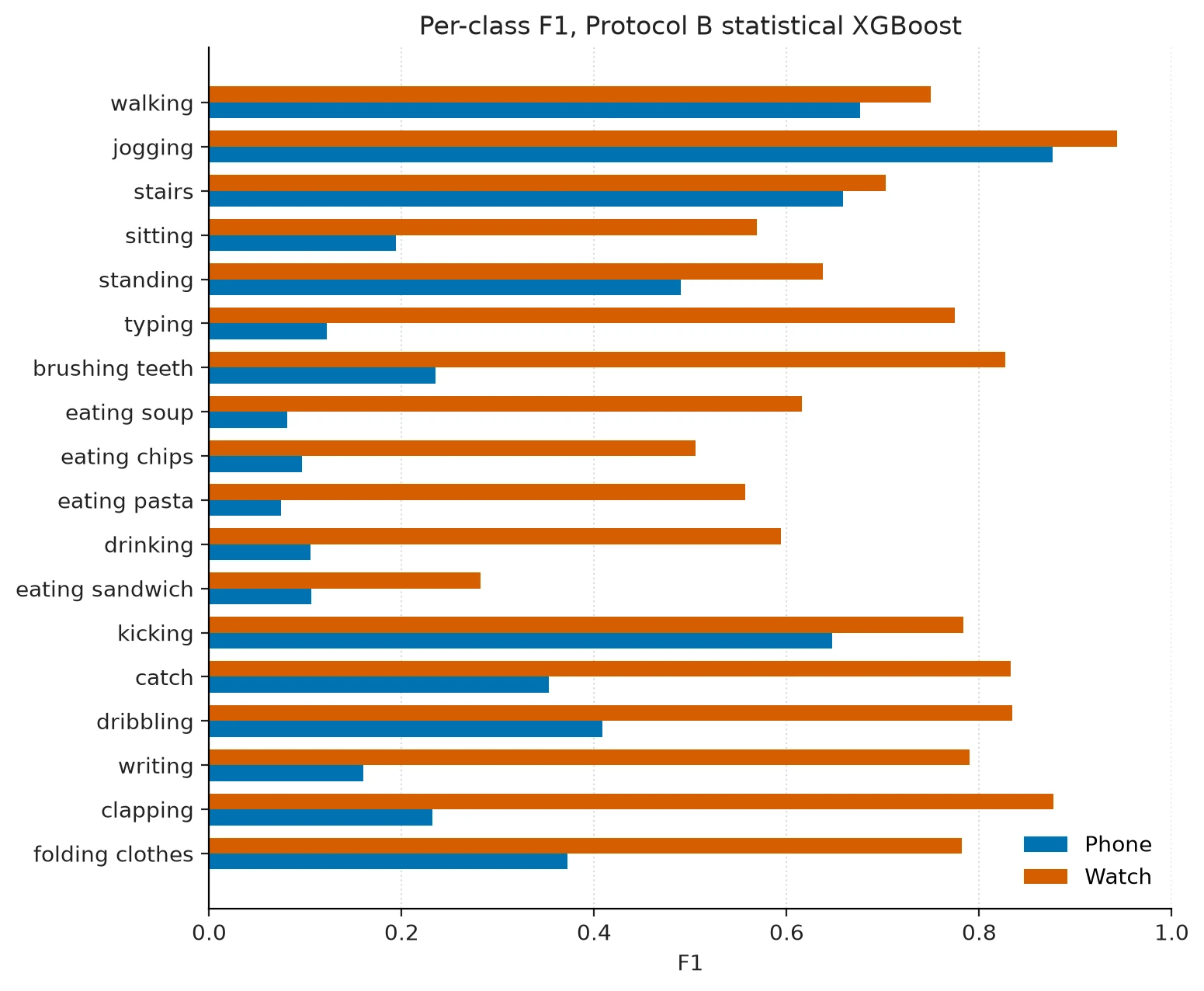
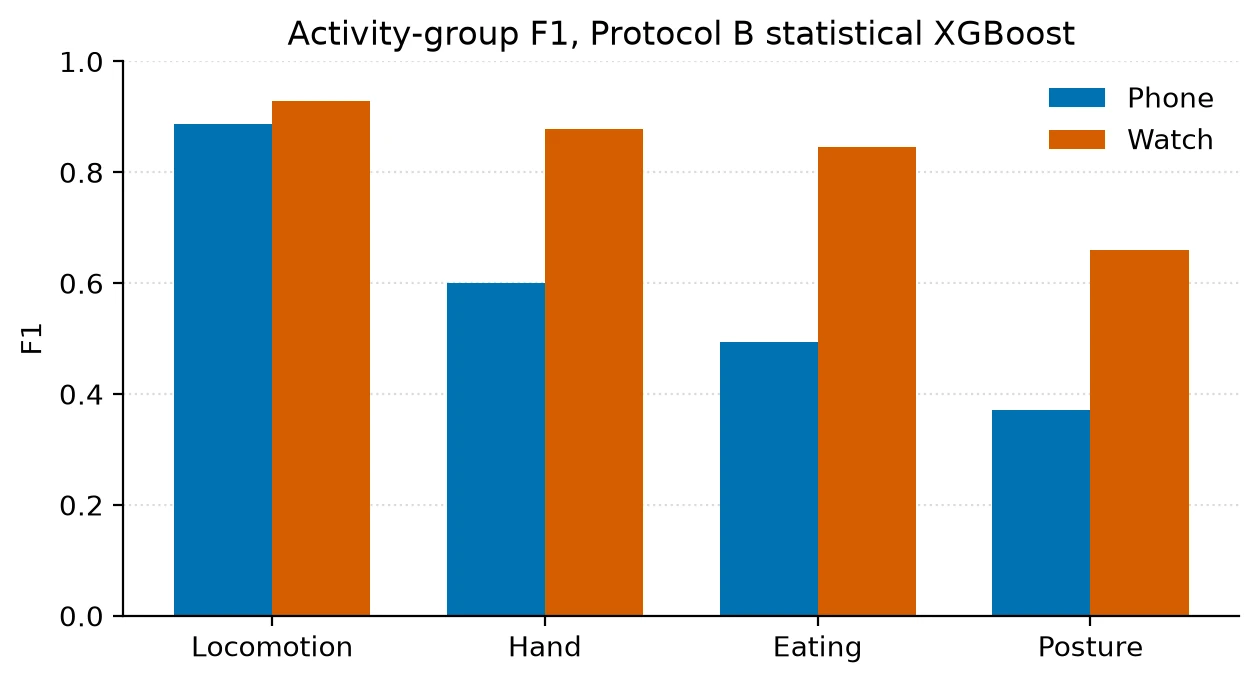
Do not send a phone window to a watch bundle. The API returns 422 on device mismatch. Placement is part of the model. The June case study said watch soup and teeth confused with standing, and that phone handled eating better. Under GroupKFold the phone cannot name eating at all. I was reading a leaky matrix.
Ablations that did not rescue the phone
Same GroupKFold, same 200-tree family as the phone statistical control (5 s, XYZ, trim 0, reorient off, flat 18-way, macro-F1 0.3272, eating group F1 0.4945).
| Setting | Config | macro-F1 | Eating group F1 |
|---|---|---|---|
| Control 5 s XYZ | protocol_b_phone_stat_xgb | 0.3272 | 0.4945 |
| Window 10 s | ablations/window_10s | 0.3422 | 0.5151 |
| Window 2 s | ablations/window_2s | 0.2951 | 0.4610 |
| Trim first 15 s | ablations/trim_15s | 0.3247 | 0.4712 |
| Phone-accel reorient | ablations/reorient_on | 0.3230 | 0.4830 |
| Magnitude only | ablations/magnitude | 0.3142 | 0.4516 |
| Hierarchical | ablations/hierarchical | 0.3271 | 0.5855 |
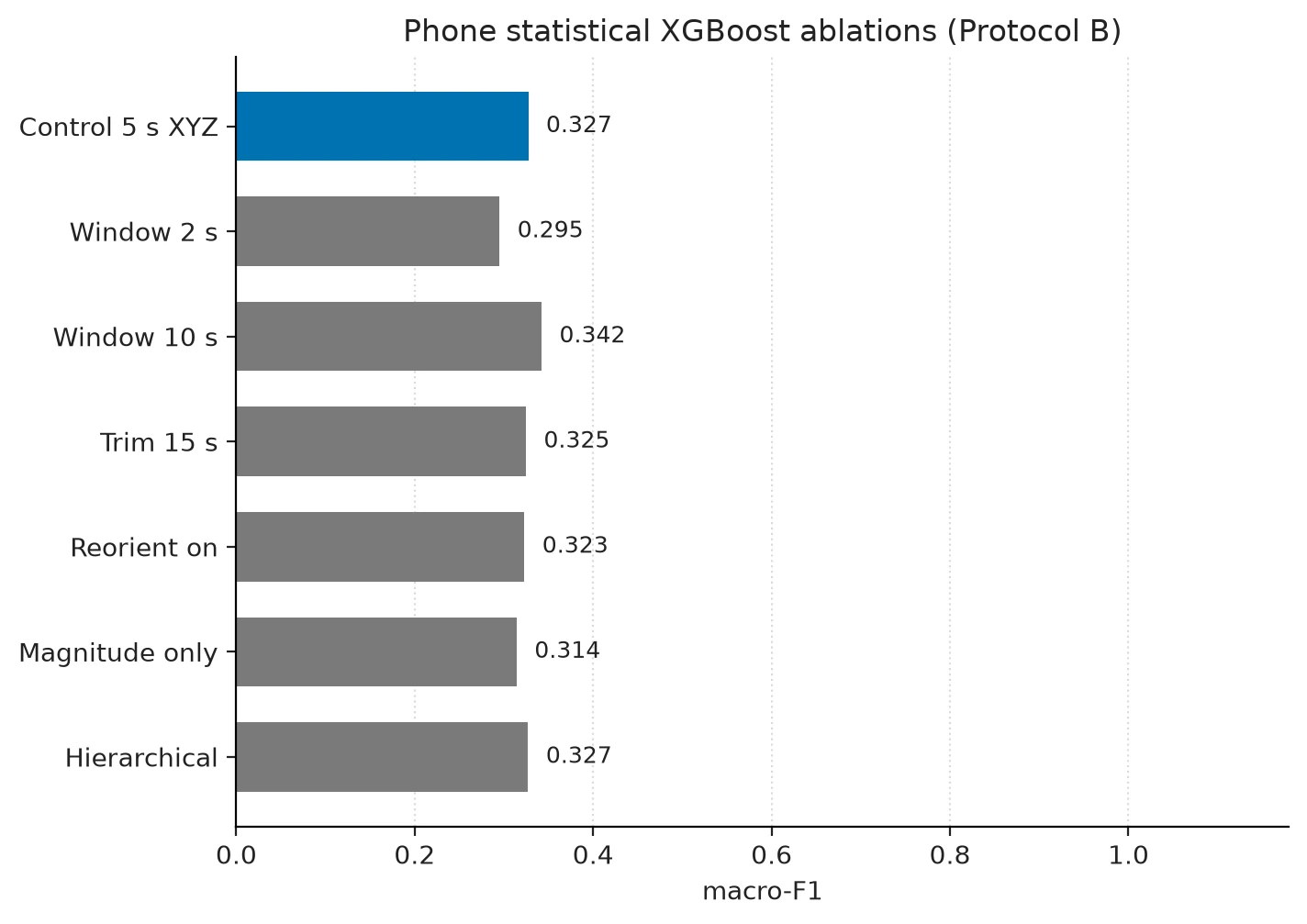
rWISDM-style gravity repair on phone accel does not raise 18-class phone GroupKFold. Dropping the first 15 s does not either, and it hurts eating. Magnitude-only (two Euclidean channels, then the same extractor, 32 features) is worse than XYZ. Axis stats matter. 10 s windows are the only row that clearly beats 5 s, by about 1.5 macro-F1 points. That is a latency and context trade, not a free lunch. Defaults stay 5 s, reorient: false, trim_start_s: 0.0.
The two-stage head trains a group classifier (locomotion / posture / hand / eating) plus four experts on the true group, then routes at inference by the predicted group. It does not beat flat 18-way on macro-F1 (0.3271 vs 0.3272). Eating group F1 rises from 0.4945 to 0.5855. Hand rises; posture drops. If the product is "is this person eating," the two-stage head is interesting. If the product is 18-way labels, it is not the shipped model. The first full-WISDM hierarchical run died on fold 1. Locomotion includes kicking (M), which is label index 12. XGBoost's sklearn wrapper rejected [0, 1, 2, 12]. Experts now remap local 0..K-1. A one-class-per-group unit test never hit that. The fixture had to split by class so every expert actually ran. No XGBoost grid search on the subject-independent table. The 982-tree student params stay on Protocol A and the B flatten pair.
What I shipped instead of another notebook
v2 is an installable har package. Config YAML pins every experiment. MLflow logs protocol, subject lists, fold macro-F1, per-group F1. Frozen JSON lives under docs/reports/. README figures are regenerated from those reports, so the charts and the tables cannot drift by hand.
make install
python -m har.data.download   # skips if the extract sentinel exists; not used in CI
make audit                    # docs/data_card.md
make prepare                  # 20 Hz parquet, gitignored
make train CONFIG=configs/protocol_b_watch_stat_xgb.yaml
make eval
make figures
make test                     # fixtures only
GitHub Actions: Python 3.13, ruff, pytest on committed tiny WISDM-shaped files. No zip in CI. Full training is local and overnight. The product surface is a CPU FastAPI that scores one 5 s, 20 Hz window (T=100, C=6). Default bundle is watch statistical XGBoost, trees exported with onnxmltools to ONNX (Open Neural Network Exchange). Statistical features still run in Python. joblib is a fallback for stubs. The serving contract and the 422 cases are in the case study. The same watch bundle is on Hugging Face as axlesubash/wisdm-watch-stat-xgb. Trees are the .onnx file. The 104-d stats still run in Python from the GitHub package. Watch windows only. A phone window is out of contract.
from pathlib import Path
import numpy as np
from huggingface_hub import snapshot_download
from har.models.export import load_bundle, predict_window

local = snapshot_download("axlesubash/wisdm-watch-stat-xgb")
bundle = load_bundle(Path(local) / "watch_stat_xgb.onnx")
window = np.zeros((100, 6), dtype=np.float32)  # ax, ay, az, gx, gy, gz
print(predict_window(bundle, window))
Export refits on all windows from that config, with one train subject used only for early stopping. That served fit is not a GroupKFold fold. Cite 0.7031 from docs/reports/protocol_b_watch_stat_xgb.json, not from the ONNX file. p95 CPU latency was 2.7 ms over 100 POST /predict calls through FastAPI TestClient, 200-tree XGBoost, statistical 100×6 window, this CPU. That is not Docker, not uvicorn, and not a claim about a phone in a pocket. Pytest only checks that a stub path stays under 500 ms. The serve image is inference-only (python:3.13-slim). It does not install MLflow, XGBoost, or pyarrow. Mount $PWD/models. Training env is pip install -e ".[dev]". pyarrow is pinned to 19.0.1 because MLflow 2.22.5 wants <20. onnx 1.17 had no wheel and tried a source build; 1.22 has a wheel. Those two pins ate more time than the FastAPI handlers.
Limits I am not going to talk past
No subject demographics, so no slice by sex, handedness, height, or phone model. Concat is extra 6-channel rows. Phone+watch fusion that shares a clock is a new pipeline. Protocol C is 46/5 × 3, not LOSO. Protocol D (hardware transfer) is not run. rWISDM argued repair matters most when you train on one device and test on the other. I did not measure that. Served ONNX is a refit. Abstain is uncalibrated. Features are still Python. Mixed raw sampling rates are repaired to 20 Hz. Residual in-session orientation flips are not fully modeled. The reorient ablation did not help 18-class phone GroupKFold, so the default stays off. 10 s windows beat 5 s on phone GroupKFold. I kept 5 s because that is the served window. Changing it is a product choice. I am not claiming state of the art against papers that shuffled windows and did not say so. v1.0.0 remains the notebook you can open if you want to see how the 0.8559 run was produced. It is not the training path. Archived notebooks still expect data/processed/raw.csv from the old loader.
What I would run next
The June post ended by saying the classifier was already useful. A pocket phone that cannot tell sitting from eating pasta is not useful as an 18-way product. A watch at 0.70 macro-F1 with sandwich at 0.28 might be, if you name the failure. That is the version I tagged as v2.0.0.
Aligned fusion. Time-aligned 12-channel phone+watch windows on the same GroupKFold splits. Stacked 6-channel rows are not that experiment.
LOSO, or more grouped repeats. Watch fold macro-F1 already spans 0.637–0.770. Protocol C is 46/5 × 3, not 51-fold.
Calibration. Temperature scaling and a non-zero abstain threshold, especially for sandwich and the phone eating cluster. Default threshold 0.0 never abstains.
A TCN only as a side-by-side row next to protocol_b_phone_stat_xgb and protocol_b_watch_stat_xgb. I will not add PyTorch "just in case."
Few-shot personalization (30–60 s of a held-out user) is in the plan as stretch. Not done.